- A phone, tablet or laptop
Official links
Who qualifies
Anyone at a library, café or other place with public Wi-Fi. Xfinity hotspots are for Xfinity internet customers (including Internet Essentials).
What you get
Free internet for browsing, maps, video and email.
After the free part
Free. Your phone's hotspot uses your mobile data allowance.
Find trusted free Wi-Fi
Public libraries usually have free Wi-Fi. Some home internet providers, such as Xfinity, include Wi-Fi hotspots for their customers; check your provider's site or app.
Pick the right network
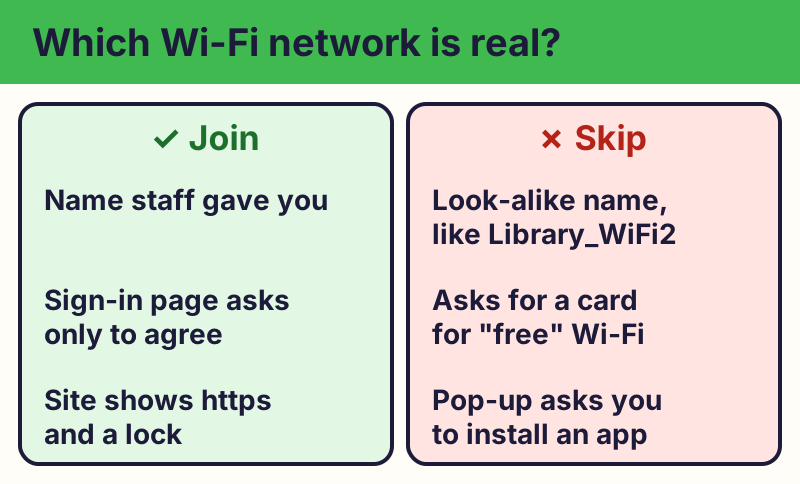
Ask staff for the exact network name. Fake hotspots often use a name that looks almost right, like "Library_Free_WiFi2". Don't join one just because it's open.
Check for the lock
Most websites now encrypt your connection. Before typing anything private, check that the web address starts with https. Many browsers no longer show a lock: Safari shows a Not Secure warning only when a site isn't safe, and Chrome shows a small settings icon instead (tap it to see Connection is secure). If you see Not Secure, don't type passwords or card numbers.
⚠️ Careful: If a Wi-Fi sign-in page asks for your card or bank details for "free" Wi-Fi, close it. Real free programs never ask for your card or bank details to give you something free, never pressure you with a countdown, and never come from a random text, pop-up or caller. Go to the official website yourself instead of tapping a link.Use your phone's hotspot for banking
For banking or shopping, it's safer to use your phone's mobile data, or turn on your phone's hotspot and connect your laptop to it.
📱 iPhone / iPad: Settings > Personal Hotspot > Allow Others to Join.
🤖 Android: Settings > Network & internet > Hotspot & tethering (names vary).
Clean up afterward
Turn off auto-join for public networks, keep your devices updated, and use two-step verification on important accounts.
Compare at a glance
| What you're doing | Public Wi-Fi | Phone data or hotspot |
|---|---|---|
| News, maps, videos | ✅ Fine | ✅ Fine |
| Email (https) | ✅ Usually fine | ✅ Fine |
| Banking, shopping | ⚠️ Better not | ✅ Safer |
| Typing a card number | ❌ Avoid | ✅ Safer |
The real address is wifi.xfinity.com. Type it yourself or use the buttons above. Fake sites use names like Library_Free_WiFi2, Free_Airport_WiFi_Login (examples only, do not visit). A real free program never asks for your card or bank details to “unlock” it.
We don't recommend free VPN apps: many are unsafe or sell your data. For private things, use your phone's data instead.
Why we trust this: Based on the FTC's public Wi-Fi guidance and Apple's and Google's own hotspot help pages, checked October 2026.
Related game: Safe or Risky?. Related explainer: Wi-Fi vs. internet: what's the difference? .