- A TV (for an antenna) or a smart TV, phone or computer (for streaming)
- Your home address (to check signals)
Official links
Who qualifies
Anyone. Antenna TV depends on how close you are to the broadcast towers.
What you get
Local news, network shows and sports over the air, plus thousands of free movies and shows on ad-supported apps.
After the free part
No monthly fee. You buy an antenna once. Streaming apps are free with ads; PBS Passport (extra shows) comes with a station donation.
See which channels reach you
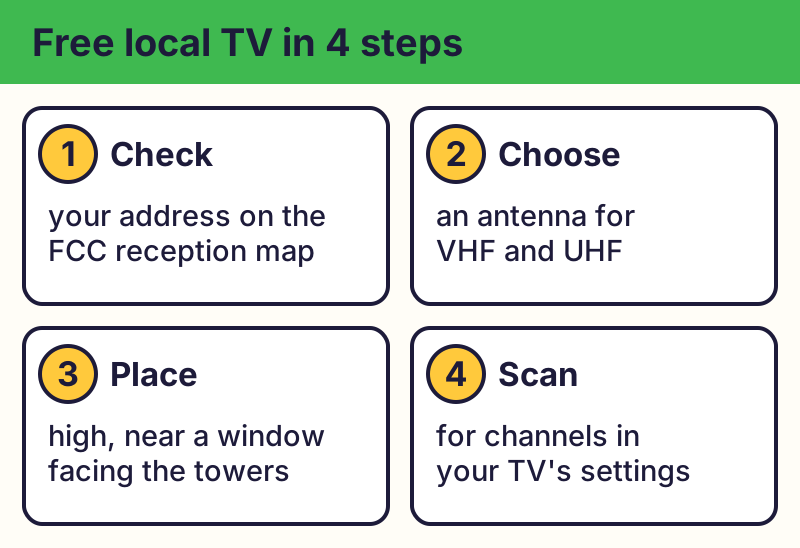
Enter your address in the FCC's DTV Reception Maps, a free map on the FCC's website. It shows nearby stations and how strong their signals are.
Pick and place an antenna
Get an antenna that picks up both VHF and UHF. Strong signals may only need an indoor antenna near a window; weak signals usually need an outdoor or attic antenna.
Scan for channels
In your TV's settings, run a channel scan (it may be called auto-tune or auto-program). Scan again whenever you move the antenna.
Free streaming apps
- Tubi, Pluto TV and The Roku Channel are free with ads, with movies, shows and live channels.
- Get them from your TV's or phone's official app store, or watch in a web browser.
- Your local library's streaming services may also be free; see the library card guide.
- Older lists may mention Amazon Freevee; it shut down in 2025.
Spot fake "free TV" offers
⚠️ Careful: Real free streaming apps don't need your card to watch. Be wary of apps or devices promising every paid channel free; they're often illegal and can carry malware. Real free programs never ask for your card or bank details to give you something free, never pressure you with a countdown, and never come from a random text, pop-up or caller. Go to the official website yourself instead of tapping a link.
Compare at a glance
| Service | Cost | Account needed? |
|---|---|---|
| Antenna (local channels) | One-time antenna | No |
| Tubi | Free with ads | Optional |
| Pluto TV | Free with ads | No |
| The Roku Channel | Free with ads | Optional; no Roku device needed |
| PBS App | Free (Passport extra) | Optional |
The real addresses are fcc.gov, tubitv.com, pluto.tv. Type it yourself or use the buttons above. Fake sites use names like all-channels-free-tv.app, freetv-unlock-premium.com (examples only, do not visit). A real free program never asks for your card or bank details to “unlock” it.
Why we trust this: Reception and antenna advice come from the FCC; app details from Tubi, Pluto TV, Roku and PBS, checked October 2026.
Related game: Safe or Risky?. Related explainer: Wi-Fi vs. internet: what's the difference? .