- Your Google, Apple or Microsoft account
- About 10 minutes
Official links
Who qualifies
Anyone with a free Google, Apple, Microsoft or Dropbox account. No card needed for the free amount.
What you get
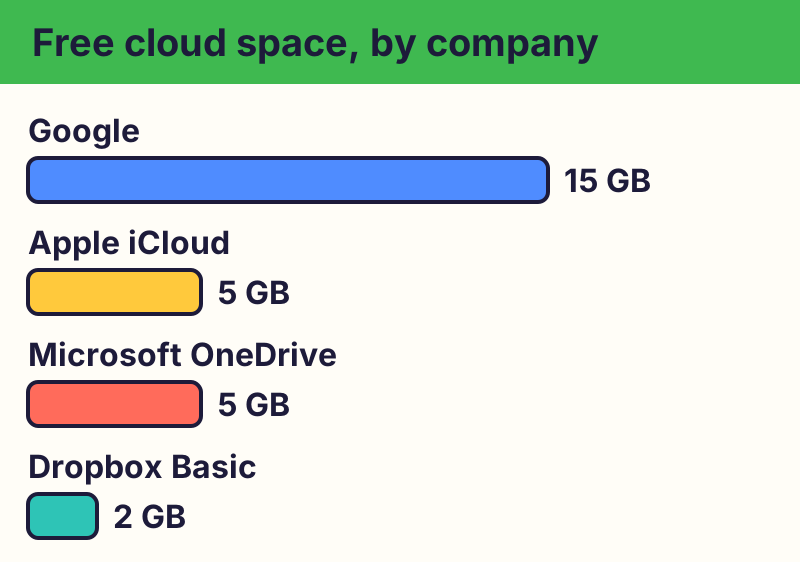
Google 15 GB (shared by Gmail, Drive and Photos), Apple iCloud 5 GB, Microsoft OneDrive 5 GB, Dropbox Basic 2 GB.
After the free part
Nothing until you choose to upgrade. The cheapest upgrades are iCloud+ 50 GB for $0.99 a month, and Google One or Microsoft 365 Basic, 100 GB for $1.99 a month (US prices, October 2026).
Know what you already get free
- Google Account: 15 GB, shared across Gmail, Google Drive and Google Photos.
- Apple Account (iCloud): 5 GB.
- Microsoft account (OneDrive): 5 GB.
- Dropbox Basic: 2 GB.
See how much you're using
📱 iPhone / iPad: Settings > your name > iCloud shows your storage bar.
🤖 Android: In the Google Photos or Google Drive app, tap your profile picture to see your storage.
On a computer, sign in at one.google.com/storage, icloud.com or onedrive.live.com.
Free up space before you pay
Empty the trash, delete big videos you've already saved elsewhere, and clear large email attachments. Deleted items usually sit in a trash or Recently Deleted folder for a while before the space comes back.
Be careful with work or school accounts
A job or school may give you Google or Microsoft storage, but it belongs to them. You can lose it when you leave, and they may be able to see it. Keep personal photos and papers in your own account.
Spot fake storage warnings
⚠️ Careful: Texts or emails saying "your cloud storage is full, pay now or lose your photos" are a common scam. Real free programs never ask for your card or bank details to give you something free, never pressure you with a countdown, and never come from a random text, pop-up or caller. Go to the official website yourself instead of tapping a link.💡 Tip: Check your storage only by opening the app or typing the website address yourself.
Compare at a glance
| Service | Free space | Cheapest upgrade (US) |
|---|---|---|
| Google (Gmail, Drive, Photos) | 15 GB | 100 GB for $1.99 a month |
| Apple iCloud | 5 GB | 50 GB for $0.99 a month; 200 GB for $2.99 |
| Microsoft OneDrive | 5 GB | 100 GB for $1.99 a month or $19.99 a year |
| Dropbox Basic | 2 GB | Paid plans on Dropbox's own site |
The real addresses are one.google.com, icloud.com, onedrive.live.com. Type it yourself or use the buttons above. Fake sites use names like icloud-storage-full.com, google-photos-backup.net (examples only, do not visit). A real free program never asks for your card or bank details to “unlock” it.
Why we trust this: Storage sizes and prices come from Google's, Apple's, Microsoft's and Dropbox's own help and pricing pages, checked October 2026.
Related game: Scam or Legit?. Related explainer: What does “the cloud” really mean? .